DARKSEC // 3DS
Homebrew and Home Menu themes for the Nintendo 3DS. Scan to install.
Games
THE NIGHT
a DarkSec RPG
FBI › Remote Install › Scan QR Code
A text RPG. Fifteen towns across six regions, five characters, quests, bosses, arenas, and a world map that fills in as you walk it. Progress saves to your SD card.
| Top screen | world, map, fights |
| Bottom screen | touch menus |
| Title ID | 000400000F8A1900 |
| Hardware | Old 3DS & New 3DS |
Apps
N3DS WEATHER
live 3D forecast
FBI › Remote Install › Scan QR Code
A weather app for the New 3DS XL. The top screen is an animated stereoscopic 3D scene of the current conditions — drifting clouds, rain, snow and storm flashes — and the bottom screen holds the forecast: a 7-day strip, hour-by-hour detail, city search and Celsius/Fahrenheit.
Weather comes from Open-Meteo, no account needed, and your location and settings save to the SD card.
| Top screen | 3D weather scene |
| Bottom screen | forecast + search |
| Alerts | wind, storms, heat |
| Units | C / F |
| Hardware | New 3DS XL |
DARKSEC // CHAT
live chat client
FBI › Remote Install › Scan QR Code
A native 3DS client for the chat room at darksec.uk/chat. The top screen is the live log, the bottom screen a touch terminal keyboard. Your handle saves to the SD card, so you can drop back in and it remembers you.
What it does:
Live chat — it polls the same room the website uses and pushes new posts to you automatically.
Three rooms — main, #h4x0r and #g4m3rs; switch in Settings and the room you're in shows next to the title.
Replies — when someone quotes your message, it renders as a dim quoted line, and you get a mention badge on the Home Menu.
Notifications — the info LED blinks orange and N NEW appears when messages land while you're away from the bottom of the log, with an optional chime you can switch off.
Scrollback — page up/down with the shoulder buttons, and tap jump to live to snap back to now.
Look — ten accent themes, a real-time clock and date separators in the log, and auto reflow for long messages.
| Top screen | live chat log |
| Bottom screen | touch keyboard |
| Rooms | main / #h4x0r / #g4m3rs |
| Title ID | 000400000F8A1700 |
| Hardware | Old 3DS & New 3DS |
Home Menu themes
These are themes, not apps — they install with Anemone3DS, not FBI. Open Anemone, hit the QR scanner, point it at the code.
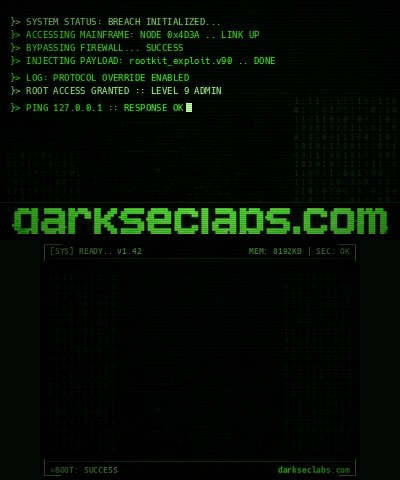
DARKSEC LABS
CRT terminal theme
Anemone3DS › QR scanner
Circuit plate, terminal log, and the darkseclabs wordmark. Phosphor green throughout.
Download .zipDARKSEC GRID
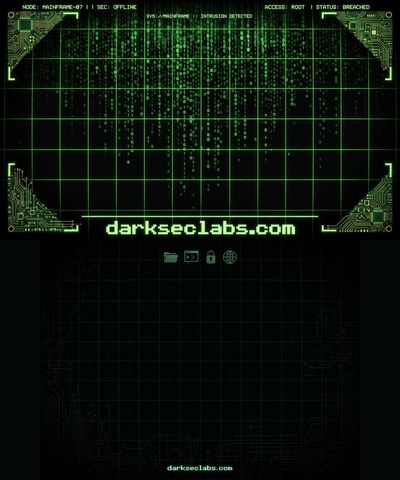
matrix rain theme
Anemone3DS › QR scanner
Matrix rain and circuit corners, with the UI palette matched to the rain and brackets in the art.
Download .zipDARKSEC INTRUSION
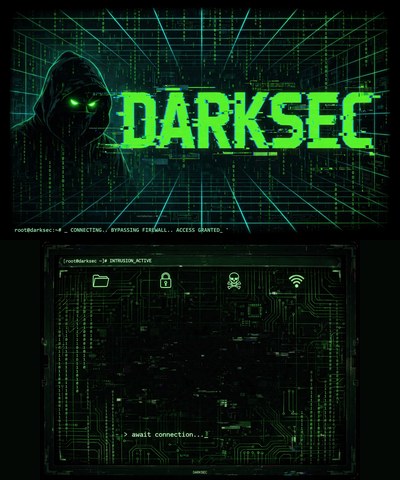
hooded skull theme
Anemone3DS › QR scanner
The hooded figure and the DARKSEC wordmark up top, an active intrusion console with a circuit board below. Access granted.
Download .zipBadges
Home Menu badges. These do not install by QR — Anemone's scanner handles themes and splashes only. Copy the set to the SD card.
DARKSEC BADGES
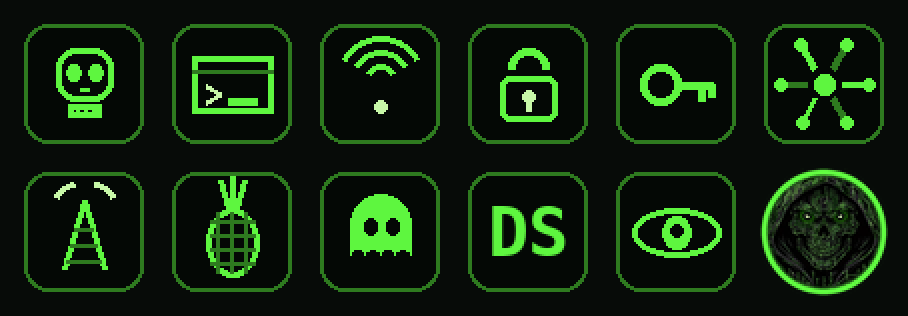
12 Home Menu badges
scan to download — badges install from the SD card, not by QR
The hooded hacker, plus skull, terminal, signal, lock, key, circuit, tower, pineapple, ghost, DS monogram and watcher. 64x64, phosphor green, drawn to stay readable at Home Menu size.
Unzip into /Badges/ on the SD card so you get
/Badges/DarkSec Badges/, then open Anemone3DS and switch to
badge mode to install the set.
Boot splash
Luma3DS boot screens — shown before the Home Menu. Not a QR install: download, copy to the SD card, and enable the splash in Luma's config.
DARKSEC INTRUSION
Luma3DS boot splash
scan to download — copy to SD, enable in Luma config
The full DARKSEC key art as your boot screen, shown before the Home Menu. Pairs with the INTRUSION theme.
Merge the luma folder into your SD root, then
boot holding SELECT and turn the splash option on.
Apps go through FBI: open it, choose Remote Install › Scan QR Code, point the camera at the code, confirm.
Badges do not install by QR at all: unzip the set into
/Badges/ on the SD card and install it from Anemone's badge mode.Themes go through Anemone3DS: open it, hit the QR scanner, point it at the code. FBI cannot install a theme.
Either can also be done by hand — drop the
.zip into
/themes/ on the SD card, or launch a .3dsx from the
Homebrew Launcher.